HomeHome WatchPlansAreas
Open/CloseKitsAsk a Question
Cellular-ready · Battery-backed hub · Ships anywhere in the U.S. · Order yours →
New · Power-Out & No-Wi-Fi Alert Kit

Cancel the summer internet.
Keep the alerts.

A YoLink cellular hub with battery backup, a power fail alarm, three leak and freeze sensors and a temperature and humidity sensor, for Martin County homes that sit empty with the internet off.

$349 no shipping charge in the U.S.

Cellular service is extra: $6.99/month, paid to YoLink, not to us.

🔒 Secure checkout by Stripe · Self-setup with a PDF guide · No wiring, no tools

About the monthly cellular fee. Cellular alerts need a YoLink LTE plan that you buy from YoLink in the app: $6.99 a month, or $83.88 a year. You pay YoLink directly; we don't charge it or earn anything from it. Without a plan, the hub works over Wi-Fi or ethernet like our other kits, and phone alerts stop whenever the home's internet is off.
Power-Out and No-Wi-Fi Alert Kit: YoLink Hub 3, Power Fail Alarm, Leak Sensor 4 and temperature and humidity sensor
Product images courtesy of YoLink.

The Gap Most Smart Sensors Leave

Plenty of snowbirds cancel or pause home internet for the summer. Most smart sensors, including our Wi-Fi kits, need that internet to reach your phone. Turn it off and they go quiet.

A summer power outage is the other blind spot. When the power drops, the A/C stops, and a closed-up Florida house heats up and gets humid fast. The router goes dark too, so even a Wi-Fi sensor that's still running can't tell you.

This kit closes both gaps. The YoLink Hub 3 can connect over 4G LTE cellular instead of your home internet, and it has its own backup battery. The Power Fail Alarm tells you the moment the power drops.

What Happens in an Outage

  • The power drops. The Power Fail Alarm sounds its local alarm on its AA backup batteries.
  • The hub keeps going. Hub 3 switches to its rechargeable backup battery. YoLink's manual says it stays fully working for about 4 to 8 hours.
  • Your phone hears about it. With an active cellular plan, the alert goes out over LTE even though the router is down. YoLink's manual recommends cellular as the backup in a home power or internet outage.
  • A long outage? Once the hub battery runs down, the hub goes offline. Turn on YoLink's hub-offline alert so you know.

Source: YoLink Hub 3 (YS1605) Installation & User Guide (PDF) and YoLink's Hub 3 and Power Fail Alarm product pages.

What's in the Box

Six devices, one battery-backed hub, one free app.

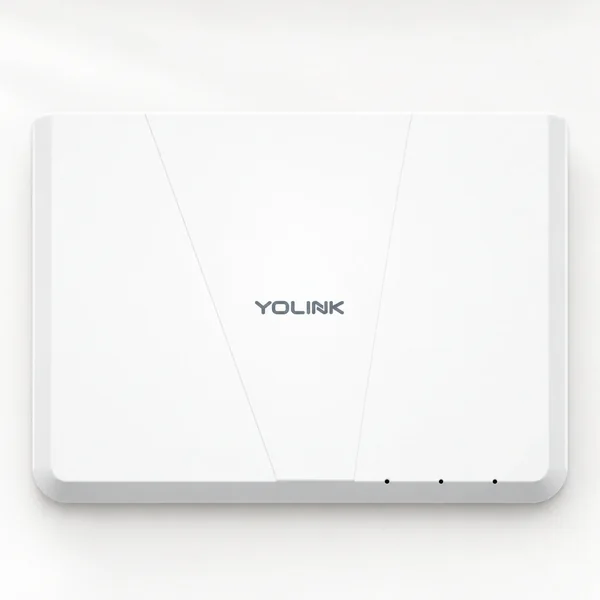
YoLink Hub 3 YS1605, a white rectangular hub with the YoLink logo and three status lights×1 hub
YoLink · Hub 3 · YS1605

Hub 3 (cellular-ready, battery backup)

Connects by ethernet, 2.4 GHz Wi-Fi or optional 4G LTE cellular. Rechargeable backup battery. Cellular needs a YoLink plan ($6.99/mo, paid to YoLink).

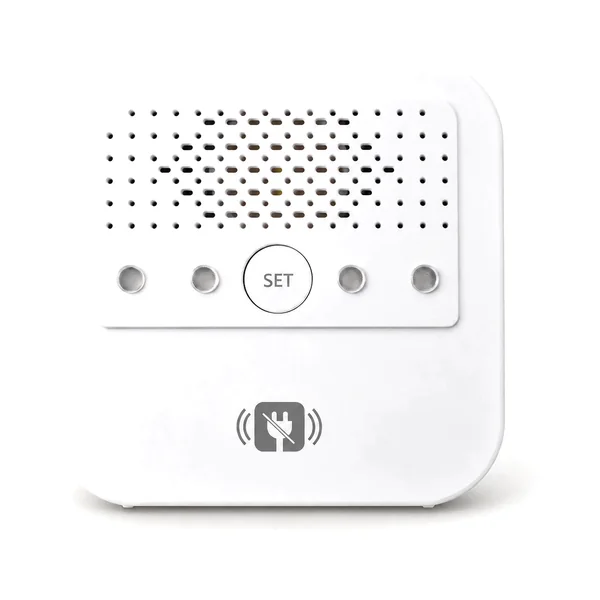
YoLink Power Fail Alarm YS7106, a white square alarm with a speaker grille and a power-plug icon×1
YoLink · YS7106

Power Fail Alarm

Plugs into the outlet you want watched. When the power drops, it sounds a loud local alarm on its AA backup batteries and the hub sends you an alert.

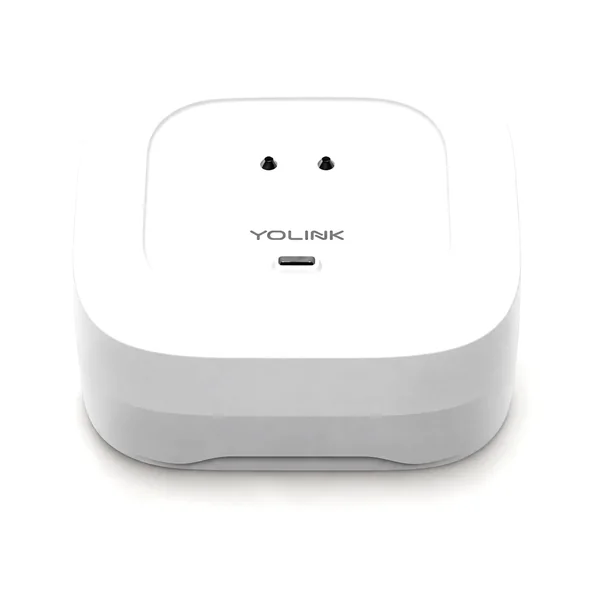
YoLink Water Leak Sensor 4, a small white puck-shaped leak and freeze sensor×3
YoLink · YS7906

Leak Sensor 4 (water leak + freeze)

Water heater, air handler and washer or sink. A loud built-in alarm plus an app alert when water is detected or it gets near freezing.

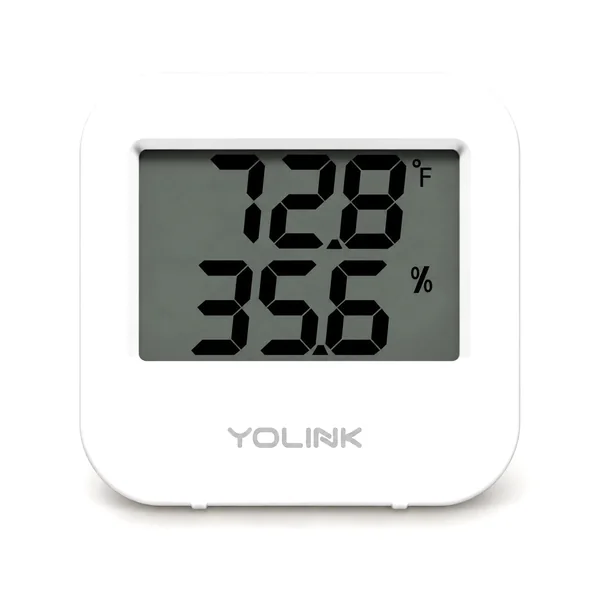
YoLink Temperature and Humidity Sensor YS8003 with a small display×1
YoLink · YS8003

Temperature + Humidity Sensor

Alerts at the limits you set, so you hear when the house heats up or humidity climbs after the A/C stops.

Setup guide

Hub, cellular plan, sensors, hub-offline alerts and a pre-departure test. Download it now (PDF).

Product images courtesy of YoLink. Models shown are what we currently ship; if one is unavailable, we substitute a comparable model.

The box list, plainly

  • 1 YoLink Hub 3 (YS1605) with power adapter, ethernet cable and rechargeable backup battery
  • 1 YoLink Power Fail Alarm (YS7106) with adapter, Micro-USB cable and 2 AA batteries
  • 3 YoLink Water Leak Sensor 4 (YS7906), leak + freeze
  • 1 YoLink Temperature & Humidity Sensor (YS8003)
  • Setup guide (PDF, download above)

Not included: the YoLink cellular plan ($6.99/mo, bought from YoLink in the app), a generator, a smoke or carbon monoxide alarm, or an automatic water shutoff. Parts ship from our fulfillment partner and may arrive in more than one box.

What It Does, and What It Doesn't

It doesIt doesn't
Alert your phone when the power drops, water is detected, or temperature or humidity cross your limitsRestore power, start a generator or shut off water
Connect over cellular when the home internet is off (with a YoLink plan)Include the cellular plan: that's $6.99/mo, paid to YoLink
Keep the hub running on its backup battery for a few hours in an outageStay online through a multi-day outage

Who It's For

  • Snowbirds who cancel or pause home internet while they're up north.
  • Homes with no internet at all, like a rarely used second home or a condo between owners.
  • Anyone who wants to know about a power outage the day it happens, not when the power bill or the smell gives it away.

Probably not for you if you keep the internet on all year and want the most sensors for the money. The Smart + AC Bundle or the Smart Protection Kit has no monthly fee.

Order the Power-Out & No-Wi-Fi Alert Kit

One kit covers one home. Add more YoLink sensors to the same hub any time.

Power-Out & No-Wi-Fi Alert Kit
$349
One-time · no wiring · no tools
  • YoLink Hub 3, cellular-ready, battery backup
  • YoLink Power Fail Alarm
  • 3 leak + freeze sensors
  • Temperature + humidity sensor
  • Setup guide (PDF), free YoLink app
Buy the Power-Out Kit – $349

🔒 Secure checkout by Stripe
Ships in 3–7 business days from our fulfillment partner. Packaging may differ.
30-day returns on unused items

Cellular plan not included: $6.99/month (or $83.88/year), bought from YoLink in the app and paid to YoLink. Questions first? Use the form below.

What happens after you order

  1. You get a Stripe receipt by email right away.
  2. The kit ships from our fulfillment partner within 3–7 business days, to any U.S. address (a gift recipient's address works too). Parts may arrive in more than one box.
  3. Set it up in about 30–45 minutes with the setup guide (PDF) and the free YoLink app. If you want alerts without Wi-Fi, start YoLink's optional cellular plan ($6.99/mo, paid to YoLink) in the app.
  4. Changed your mind? Return unused items within 30 days for a refund. Details

Common Questions

Is there a monthly fee?

Only if you want cellular. Cellular service is a YoLink subscription that you pay directly to YoLink: $6.99 a month (YoLink also sells an $83.88 annual plan). We don't charge it and don't get a cut. You start it in the YoLink app. Without it, the hub works over Wi-Fi or ethernet with no monthly fee, like our other kits.

Will it work if I cancel the home internet for the summer?

Yes, with an active YoLink cellular plan. Hub 3 has a built-in SIM for 4G LTE and uses it when ethernet and Wi-Fi aren't available. Without a plan and without internet, the sensors still sound their alarms in the house, but no alert reaches your phone.

What happens when the power goes out?

The Power Fail Alarm sounds on its AA backup batteries, and the hub switches to its rechargeable backup battery. YoLink's Hub 3 manual says that battery keeps the hub fully working for about 4 to 8 hours and recommends cellular as the backup connection in a home power or internet outage, so with an active cellular plan the power-loss alert can still reach your phone after the router goes dark. YoLink Hub 3 manual (PDF).

What if the outage lasts longer than the hub battery?

The hub goes offline once its battery runs down. Turn on YoLink's hub-offline alert in the app (the setup guide shows how) so you hear about that too, and plan who can check the house.

Does cellular work everywhere?

It depends on the 4G LTE signal at your home. After setup, the LTE icon on the hub's page in the app turns green when service is active. A central spot near a window usually helps.

How long does setup take?

About 30 to 45 minutes: plug in the hub, add each device in the app, start the cellular plan if you want it, place the sensors and run the tests in the setup guide (PDF).

Does it restore power or shut off water?

No. It alerts you so you or someone local can act. It doesn't start a generator, restore power, shut off water or call anyone for you.

Can I add more sensors later?

Yes. Other YoLink sensors, such as more leak sensors or the A/C drain pan float sensor from our AC Drain Line Overflow Kit, pair to the same Hub 3.

How long does shipping take?

Orders ship in 3–7 business days from our fulfillment partner to any U.S. address. Packaging may differ, and parts may arrive in more than one box. No shipping charge is added at checkout.

Can I return it?

Yes. Unused items in original condition can be returned within 30 days for a refund. Use the form below or email hello@homewatchtreasurecoast.com to start a return. See our shipping and returns policy for details.

Can I send it as a gift?

Yes. Enter the recipient's U.S. address as the shipping address at checkout, and it ships there with no shipping charge added. Let them know the optional cellular service is a $6.99-a-month YoLink plan they start in the YoLink app; we don't charge it.

Guides: what to set the A/C to when you leave · turning off the water · how to protect a vacant home · snowbird home watch

Know when the power drops, even with the internet off.

A battery-backed cellular hub, a power fail alarm and leak, freeze and humidity sensors for a one-time $349. Cellular plan $6.99/mo, paid to YoLink.

Buy the Power-Out Kit – $349

🔒 Secure checkout by Stripe · Shipping & returns

Free Quote · Free Walkthrough

Questions about the Power-Out Alert Kit?

Tell us about your home and whether you plan to keep the internet on. We reply personally, usually within one business day.

  • ✓ Free walkthrough & baseline photos before you leave
  • ✓ Photo report after every visit
  • ✓ Plans from $89/mo · one-time visit $75 (book online) · 🔒 Secure checkout by Stripe
  • ✓ No contracts — cancel or pause any time
Get your free quote
No spam, no pressure. Your info is only used to reply to you. Privacy